




Economical alternative to original Arduino ethernet shields, allows data rates up to 10 Mbps and is achieved with a traditional assembly components.
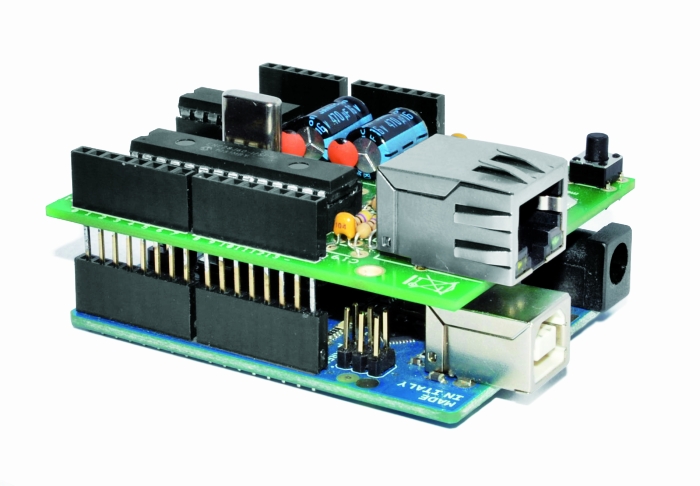
One of the most interesting shield that you can mount on the Arduino platform is certainly the ethernet shield, because enable numerous networking applications such as remote control of systems and users, web access and publication of data, and more yet, the simplicity of finding and integrating open-source libraries on Arduino IDE does the rest. The usefulness of LAN connectivity has meant that the market would respond by offering different ethernet shield, first of all the original Arduino Ethernet Shield, which was accompanied by the good shield by Seeed Studio, both of these circuits are based on the chipset WIZnet W5100, allow multiple socket connections and can work at 100 Mbps
This ethernet shield is low-cost thanks to components used: all traditional mounting (THT). This feature makes the circuit accessible to those who haven’t the equipment to assemble SMD components. The data-rate is limited to 10 Mbps.
Wiring diagram
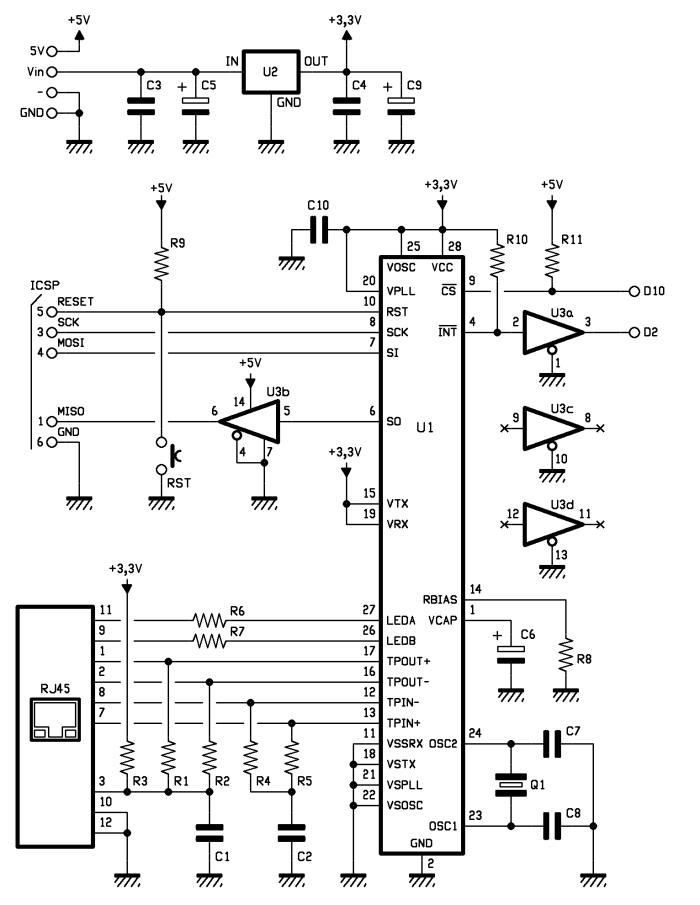
The MAC controller supports both Unicast, Multicast and Broadcast packets, has a programmable 64-byte pattern within a margin allowed to the user and programmable wake-up on multiple packet formats (Magic Packet, Unicast, Multicast, Broadcast, specific packet match or any packet).
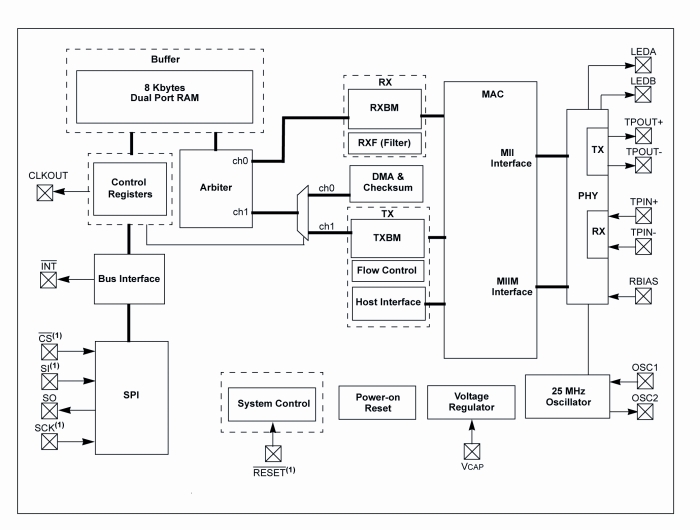
MISO is the output data of the slave device and the input of Arduino, while MOSI is the opposite; SCK is the clock that marks the two-way communication on the SPI bus and RESET the reset line, which is also connected to a button that allows you to reset the Ethernet interface, if necessary, manually. The digital D10 and D2 lines of Arduino are used, respectively, for the control of CS (Chip Select, active logic zero) and the reading of INT. U3B is used to adapt the logic levels 0/3, 3 V to those of Arduino 0/5 V.
The ENC28J60 operates with a clock of 25 MHz, defined by the quartz Q1 connected between the pins 23 and 24; the capacitor connected to pin VCAP filters the output voltage (2.5 V) of the internal controller and should preferably be of the type low ESR (low series resistance parasite). The resistor connected to RBIAS is used to bias the LAN transceiver that is part of the pin TPIN + / – and TPOUT + / -.
We conclude the analysis of the circuit diagram of the shield with the power that is drawn by Arduino 5V and Vin through the strip: the first provides the 5 volts continuous stabilized points of the circuit that require them (basically the 74HC125 and the resistance of pull Line-up reset and Chip Select) and the second give power to the integrated regulator U2, which creates the 3.3 volts needed to power the microcontroller and circuits contained in the RJ45 jack.
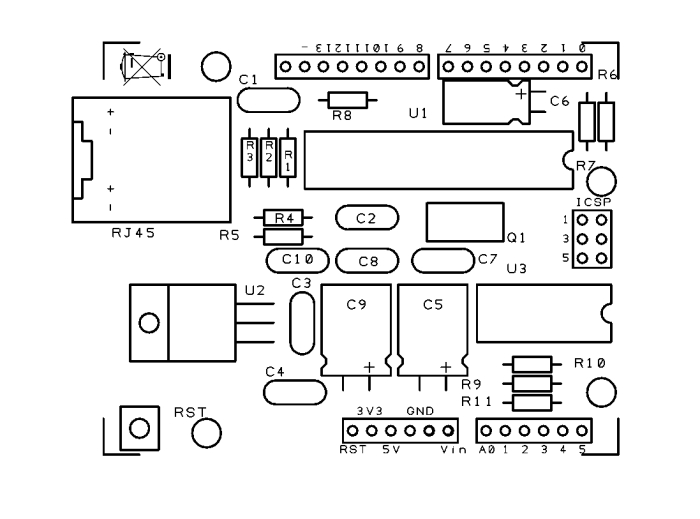

BOM
[code]
R1: 47 ohm
R2: 47 ohm
R3: 18 ohm
R4: 47 ohm
R5: 47 ohm
R6: 270 ohm
R7: 270 ohm
R8: 2,7 kohm
R9: 10 kohm
R10: 10 kohm
R11: 10 kohm
C1: 100 nF
C2: 100 nF
C3: 100 nF
C4: 100 nF
C5: 470 µF 16 VL
C6: 10 µF 63 VL
C7: 15 pF
C8: 15 pF
C9: 470 µF 16 VL
C10: 100 nF
U1: ENC28J60
U2: LD1086-V33
U3: 74HC125
RST: Microswitch
Q1: 25 MHz
RJ45: RJ45 (RJ45EM)
– chip holder 7+7
– chip holder 14+14
– Strip M/F 6 (2 pz.)
– Strip M/F 8 (2 pz.)
– Strip F 2×3
[/code]
The library for ENC28J60
The original library from which we derived can be downloaded from the site https://github.com/jcw/ethercard ; from our site you can download the library itself but with a higher number of application examples.
Here you will find a sketch example to build a Web Server, in particular, in the current web page you will see the hours: minutes: seconds elapsed from the ignition of Arduino.
// This is a demo of the RBBB running as webserver with the Ether Card
// 2010-05-28 <jc@wippler.nl> http://opensource.org/licenses/mit-license.php

#include <EtherCard.h>

// ethernet interface mac address
static byte mymac[] = { 0x74,0x69,0x69,0x2D,0x30,0x31 };
// ethernet interface ip address
static byte myip[] = { 192,168,0,188 };
// gateway ip address
static byte gwip[] = { 192,168,0,1 };

byte Ethernet::buffer[500];
BufferFiller bfill;

void setup () {
  if (ether.begin(sizeof Ethernet::buffer, mymac) == 0)
    Serial.println( "Failed to access Ethernet controller");
  ether.staticSetup(myip);
}

static word homePage() {
  long t = millis() / 1000;
  word h = t / 3600;
  byte m = (t / 60) % 60;
  byte s = t % 60;
  bfill = ether.tcpOffset();
  bfill.emit_p(PSTR(
    "HTTP/1.0 200 OK\r\n"
    "Content-Type: text/html\r\n"
    "Pragma: no-cache\r\n"
    "\r\n"
    "<meta http-equiv='refresh' content='1'/>"
    "<span class="hiddenSpellError" pre="">RBBB</span> server"
    "<h1>$D$D:$D$D:$D$D</h1>"),
      h/10, h%10, m/10, m%10, s/10, s%10);
  return bfill.position();
}

void loop () {
  word len = ether.packetReceive();
  word pos = ether.packetLoop(len);

  if (pos)  // check if valid tcp data is received
    ether.httpServerReply(homePage()); // send web page data
}

Library Ethernet shield with ENC28J60

Hi,
This will really help in controlling stuff from internet like wireless ac/dc switches.
Regards,
Ashwani Sihag
Are you willing to share the eagle/kicad files?
Peter
I’m sorry but I haven’t the Eagle file.
If it’s fine for you I can share the gerber file of course.
[…] infatti quello originale costa intorno ai 50€. Open Electronics a la soluzione al problema: Ethercard realizzato con un controller Ethernet da pochi […]
Is there a parts list you’d share with us?
I’d really like to try and make my own.
@ Matt
Sorry I forgot the BOM.
Now is on line ;-)
And I add the Gerber files
Thanks for the gerbers, what CAD package did you use to design it? ny chance of sharing the source files?
Peter
I used Easy PC (number One system).
http://www.numberone.com/
It isn’t a free sfw.
I can share the source without problem.
Do you can open it?
[…] Low cost Ethernet shield with ENC28J60 – Open Electronics – jen 10M, využívá Microchip ENC28J60 + dostupná knihovna, cena 19.90E […]
How comes that in the ENC28J60 DATASHEET they say to use coils in TPIN and TPOUT ports and you don’t use them in this shield? their picture (http://i48.tinypic.com/mlio00.png)
Btw nice project! Thanks.
Why we need the 3.3 voltage regulator? for arduino old versions?
the arduino uno already have 3v3.
I’m very interested in build this, I’ll do it on my vacations.
TIP: Microchip can send you a couple of free sample of ENC28J60…
can we replace the LD1086-V33 integrated regulator with LD11173.3V
@NMS
hi we use an RJ45 port with coils inside
@gordon
The arduino 3.3V regulator can provide
“DC Current for 3.3V Pin 50 mA”
The ENC28J60 required
“IDD Operating Current — 250 mA, VDD = 3.45V, FCLK = 10 MHz, SO = Open”
@ankush tripathi
Yes of course.
Check the Pin out
I’ve managed to put one of these together on a breadboard but I’m finding the connection is quite sporadic. Running ping continuously from Windows gives about 50% packet loss, with the packets that are returned usually coming in small groups (2-3 packets). Might you have any guesses at where the problem could be? The major difference between my board and your diagram is the RJ45 port, mine is a Stewart SI-60002-F (http://goo.gl/Q1ExQ) and I’ve only wired TPIN+/- and TPOUT+/- to pins 1/3 and 4/6 on the jack respectively, all other contacts are open. The other difference is that I’ve used a complete oscillator unit instead of a crystal, but the controller datasheet claims this is ok. Any help would be greatly appreciated, I’m new to all this!
I believe I’ve fixed the issue – resoldered my connector with shorter wires … think I might have been subject to signal degradation due to transmission on untwisted pairs.
Hi Mat.
Good news, probaly using a breadboard you find this problem.
[…] + ethernet (TCP/IP) yes you can do it with a microcontroller and an Ethernet module Reff : http://www.open-electronics.org/low-…with-enc28j60/ : http://www.open-electronics.org/arduino-gsm-shield/ : […]
Is it work with Mega???
I built the circuit and my code compiles with no problem, I am trying similar code but it is DHCP. My code seems to get stuck on
if (ether.begin(sizeof Ethernet::buffer, mymac) == 0)
when I am running it. Nothing happens after that point. Any ideas?
Hi, we are using this library https://github.com/jcw/ethercard
I suggest you to write direclty in the forum
Having trouble finding RJ45 that fits the dimensions for this pcb. Can anyone give me a serial number for an RJ45 that fits?
Hi, this is the connector:
http://www.futurashop.it/pdf_eng/7300-RJ45EM.pdf
Hi,
I have a few questions:
— Is it possible to use the Arduino Ethernet library directly?
— Whats more or less the price diference?
There is a link for the library. The library is not the same of the original Arduino ethernet shield.
The price is about the halt
Am I right that it is online possible to run this shield if you power it over the power connector? USB only isn’t possible, is it?
You have to power the Arduino with an external power supply. The USB isn’t enough
Ah ok. Thanks. Is it possible that I power the Arduino with 5V? So the shield also get’s 5V?
No problem for the shield, but Arduino need not less then 7V
Ok. Will power the arduino and shield with 12V. Hope it’ll be suitable for both.
[…] http://www.open-electronics.org/low-cost-ethernet-shield-with-enc28j60/ […]
Hmm, 3.3V is needed for ENC and RJ45, here you are using LD1086-V33 witch is 1.5A, but it shouldn’t be problem to use LD111V33 witch is only 800mA, or I am wrong?
800 mA is good, don’t worry
Thx for the reply, I just wanted to make sure :)
Hi!
I ask you to excuse me for the stupid question of a newbie…
I am trying to make my first electronic card. I have dowloaded the two copper layer (bottom and top) I have made the card, and I am about to solder the components. I noticed that some copper paths are positionned just under the RJ45 connector! So my question is, how am I supposed to solder?
Any help or advice?
FG
Normaly you hate to use a two layer PCB, with vias.
perhaps someone has an eagle file of this project?
I’m sorry, not available
Can anyone give me the schematic of this Board Please :)
?
In this post
Hi everyone, i made the schematic but i can’t make it work properly, any help please….
be sure to connect the spi pins
I have connected them but still not working
Could you send me a photo?
Can you please send me the picture of a bare pcb please, both sides?
In this post there are a lot of photos…
can I get the bare pcb from you?
Not yet.
I’ll inser it in our store
http://store.open-electronics.org/Breakout/Breakout%20PCB
Can someone confirm me that all the components have to be soldered on the face where “8955” is written on the pcb?
Anyone know why such large caps are used on either side of the 3.3V regulator? The spec sheet for that model says that 10uF or more on the output side is needed for stability but 470uF seems insane! Was wondering if experience led to that…
We use 470, more is better than less :-)
I was wondering if real-world experience lead to that increase or was that just chosen from the start…
[…] Low-Cost Arduino Ethernet Shield […]
hi , please help meeee : when I connect the board ethernet to arduino , they doesen’t work ( the led ON of arduino isn’t on now)
Hi Boris, great job with the design.
Can you please elaborate on the role of the 74HC125 in the board since it does not appear in the schematic? if I understand correctly it is used to isolate the SPI lines from the arduino instead of an optocoupler?
Thanks!
In the schematics is U3
Is there a sequence of command/reads that would indicate if the ENC28J60 is running and ready?
The RJ45 jack shows the green light on, and the orange light blinks whenever the connected pc tries to ping it or request a web page from it. However, it always times out (the micro never sees the request)… So not sure if it’s the host not configured correctly (crossover cable, static ip) or if it’s the micro software (tcp/ip stack, static ip, spi) or if it’s the jumper wires (spi, power) going to the ENC module.
With the logic analyzer, the SPI communication seems reasonable, that is, nCS goes low followed by 8 SCLKS (1Mhz), and then the expected transmitted data that the micro sends. The ENC does often respond with non-zero data. The SPI mode is 0 (CPOL=CPHA=0 ; Data sampled on Rising edge).
http://i.imgur.com/WEXyvhp.jpg
This is the spi activity to/from the enc28j60 module
Out In
FFh 00h
FFh 00h
BFh 00h
03h 00h
9Fh 00h
00h 00h
48h 00h
00h 00h
49h 00h
00h 00h
4Ch 00h
00h 00h
4Dh 00h
00h 00h
4Ah 00h
FFh 00h
4Bh 40h
07h 00h
4Ch 40h
FFh 00h
4Dh 40h
07h 04h
BFh 00h
03h 02h
9Fh 80h
01h 01h
58h 50h
B1h A0h
48h 48h
3Fh 38h
49h 49h
30h 30h
50h 50h
F9h C0h
51h 51h
F7h E0h
BFh A0h
03h 03h
9Fh 90h
02h 02h
40h 40h
0Dh 0Dh
41h 41h
00h 00h
82h 82h
32h 32h
46h 46h
12h 12h
47h 47h
0Ch 0Ch
44h 44h
12h 12h
4Ah 4Ah
DCh D8h
…
Any suggestions how to see if the enc28j60 chip is working properly?
Hello,
Unfortunately I had no success establishing a lan connection. It says:
[webClient]
Failed to access Ethernet controller
Are there differences between the RJ45 components? Which one can you recommend?
[…] more involved DIY choice is a shield based on the cheap (just $3) ENC28J60. A blog post at Open Electronics details the building and use of the shield while you can buy what appears to be a fully assembled […]
[…] more involved DIY choice is a shield based on the cheap (just $3) ENC28J60. A blog post at Open Electronics details the building and use of the shield while you can buy what appears to be a fully assembled […]
thanks that i could download i made this favorit for
reading again with regard and merily greeting you Job Tielens